
Welcome to the Cox Community
Our community is a collaborative place to learn about Cox products and services. Jump into the conversation today!
Messages
Selected Messages

Contributor
•
Good Morning Everyone,
I have Cox HSI ultimate and DTV with you guys. I can say I'm quite satisfied with the service. I originally had DTV and then in January of 2015 decided to get internet with you guys because I had y'all in Irvine and my current provider was terrible. I was told I could not get internet due to the apartments I live in being contract blocked from having Cox for internet. I was able to get my management involved and Cox's higher management involved and I was able to be a contract exception, thus making me the only person on my node with HSI which was awesome.
Being the only person on my node with HSI was great because I literally had the fastest internet in town with 8ms ping times. They had to run me a second drop solely for my internet as the tap is underpowered and the original apartment drop has ingress so I have two dedicated drops going to my apartment.
In August, my apartment decided to switch their official internet provider to cox which meant everyone has Cox for internet now since its free up to the preferred plan. Ever since then, Ive had numerous issues. Ive had numerous techs out here who say its the plant and I agree with them.
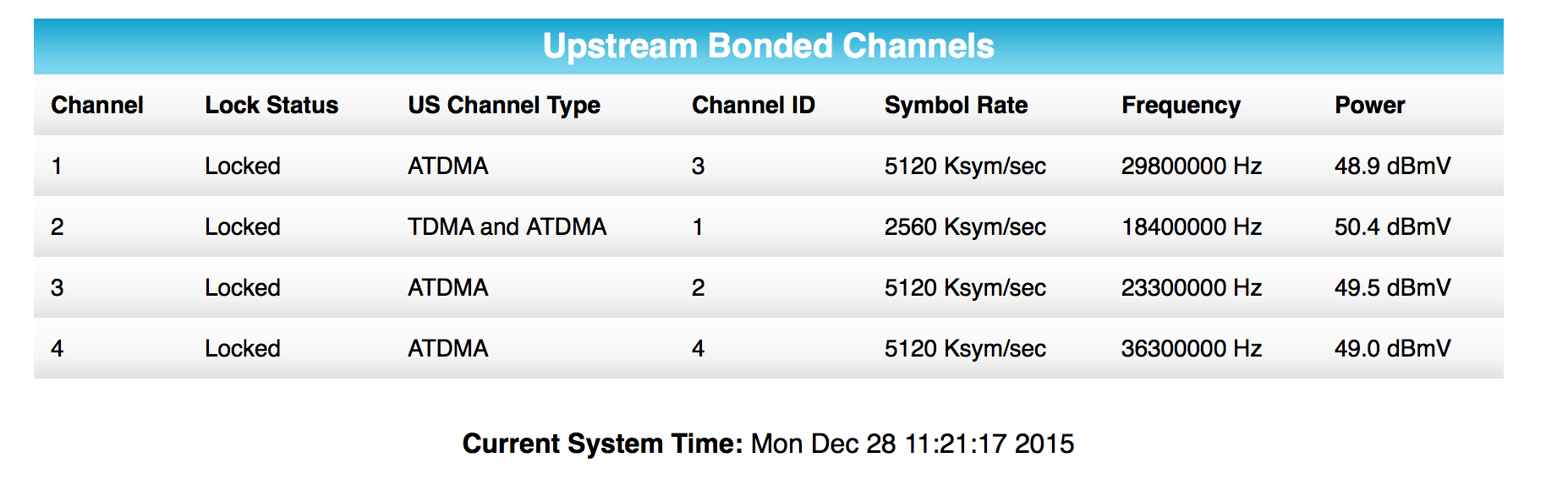
Basically my internet gets laggy whenever my upstream DOCSIS transmits go high. I also went from having a 8ms ping to a 31ms ping to the local servers in town (testing with SB6183 direct to brand new $3000 macbook pro). Right now as I'm writing this and you can see through my polling history, my transmits are around 50, which is way too high for a brand new line without any splits. It will swing anywhere from 42 during some parts of the day to the high of 51. They have checked the tap and verified the transmits are high off the tap even though its only a 20 value tap (transmit specs off a 20 value should be between 35-38). Every tech whose been here has referred to maintenance. Problem is when maintenance gets here and tests off the tap, the transmits are almost in spec. My last service call, the tech put in for high transmits again and fluctuating transmits. When he put in for fluctuating transmits, he meant that the transmits where changing too much during the day. Unfortunately the maintenance tech took this as though its fluctuating every second, which its not. So he said everything is fine and left.
Can you guys help me with this? Every tech visit I have keeps saying is a plant issue which I agree. I am sure there is either too much noise in the plant or there is a cracked feeder somewhere...It is an old apartment complex...
Here is last nights transmits:
Tecknowhelp
Valued Contributor II
•
What are your complete signal levels? They should be available at 192.168.100.1 unless a gateway. If so, what model?
Also, what model router do you have, if applicable.
When the lag occurs are your upload and download speeds good? Have any data? Ping plots? Tracert to game servers? Etc.
0
0
cpljp
Contributor
•
This is my signal levels right now:
49.0 dBmV
Modem is SB6183.This is my signal levels with a brand new 80 foot drop straight to the modem. No splits, no splices. Router is a TP-Link Archer C9. My DL and UL speeds are always good but you can see spikes in the tests. I routinely get 340 mbps down and 34 mbps up on wifi. No packet loss
Lag and sluggishness goes away when my transmits go down to 42-45
0
0
Tecknowhelp
Valued Contributor II
•
Happen to know anything of your signal levels before the issue started?
Also, possibility of more people using node? Any new apartment complexes near by? Gated communities?
Last, happen to know how far away you are from the amp? Do you have above ground or below ground wiring? If poles, see picture here for what a amp looks like.
0
0
cpljp
Contributor
•
This is from July, few weeks before everyone got HSI
Nope we will always have our own node. Just houses around us.
At the street is on the pole and then it crosses the street to my complex then goes underground to a large green pedestal where the node is. After that, the trunk goes to Im assuming a few line extenders around the complex (but I don't know where they are since its underground) which then goes via feeder to taps on the side of every building
0
0
cpljp
Contributor
•
Did a speedtest right now. Right now everything is working perfectly since my transmits are in spec. Im fairly certain there is a cracked feeder somewhere causing the fluctuating transmits.
0
0
cpljp
Contributor
•
This was taken 3 hours after my previous post this morning. There really shouldn't be a 5 decibel swing on every channel and only on the upstream.
And 30 mins after this:
0
0
EdwardH
Valued Contributor
•
---
0
0
cpljp
Contributor
•
It is absolutely random
0
0