

New Contributor
•
3 Messages
New modem is still getting constant T3 and Dynamic Range Window violation errors
Equipment:
OLD Netgear CM1200 (bought in 2020)
Google Nest Wifi and Access Point (bought in 2021)
TPLink 5 port switch
NEW Arris SB8200 (purchased yesterday)
Since the beginning of December 2022 my 2 year old NetGear CM1200 had been disconnecting daily between 6am-9am and every single day I had to physically reset the modem since the COX app and chat support couldn't reset it remotely. COX chat claimed it was my 27 devices connected to Wifi (I had the ultimate plan) and that I needed to upgrade to the Gigablast. Conveniently the Gigablast plan was on a deal that was $5 less than the Ultimate so I upgraded, same issue. I had a technician finally come out a couple days ago and he checked EVERYTHING.
He checked the following with the following results
- Checked the connection to the CM1200, speeds on Gigablast was about 430mbps download and 27 upload.
- Disconnected the router and modem, connected directly to the Coax cable from the wall, speeds were then 830mbps download and 36 upload. Tested 10,000 packets and none were lost.
- Checked the network hub in the laundry room that came with the house (I don't use it since I don't have a switch in there), he saw there was a MoCA connection (I believe?) where the outside network Coax line was connected to the office coax line (which my modem was connected to) so he disconnected them and tested the connection to the outside network. The test results were 830mbps download and 36 upload. Tested 10,000 packets and none were lost.
- He went outside to check the network box on the side of my house and confirmed there is no splitter and that it's a direct connection, he tested the connection and the speeds were the same as inside. Tested 10,000 packets and none were lost.
- He went to the utilities box and tested the line there, he tested 10,000 packets and none were lost. Speeds were the same as in the house. All tests were normal.
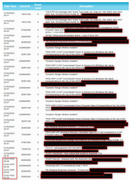
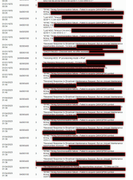
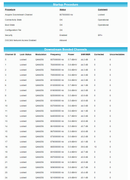
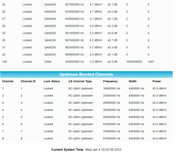
Ultimately he said that my modem was "likely" the problem and that I should try a new one to see if things improve. I purchased the Arris SB8200 yesterday, I chatted with Cox to activate it around 2pm and everything was good until 2am when my Google Nest Wifi notified me that the internet went out for 30 mins. I haven't had any outages since 2am so I checked the logs and it looks the same as the CM1200 logs were.

Related Content
Closed
0
0
Closed
1
0
Closed
2
0
Closed
4
0
Closed
1
0
WiderMouthOpen
Esteemed Contributor III
•
3.5K Messages
T3 are from noise on the upstream. Your levels are good so it must be intermittent noise that happens between 6-9AM. You said you connected direct to the outlet, but can you describe how the coaxial gets from the road to the room the modem is in? Do you have underground wiring outside? Do you have any splitters or amps inside? If not, I would schedule another technician to look for noise on your tap outside. If you have had more then 3 technicians in a month, I would file a informal FCC complaint.
9
0
WiderMouthOpen
Esteemed Contributor III
•
3.5K Messages
I reread your OP and saw that you said no splitters in the house box. I will assume you have a direct connection from the house box to the outlet. If so, I would email Cox(cox.help@cox.com) and ask them to see if others on your street are getting T3 errors.
0
0