
Welcome to the Cox Community
Our community is a collaborative place to learn about Cox products and services. Jump into the conversation today!
Messages
Selected Messages

New Contributor
•
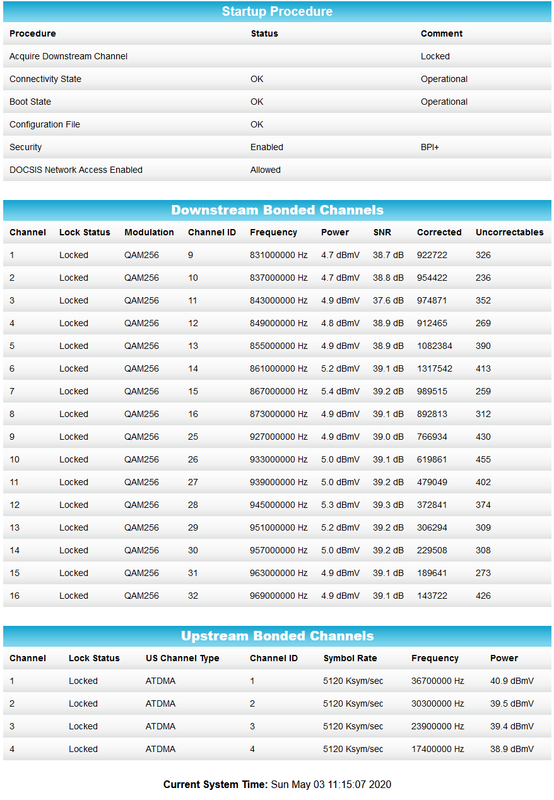
I've been experiencing this issue every day for over a month now. Internet will be fine for a portion of the day but then suddenly speeds will fall down to very low levels (15 down, 0.5 up usually) and stay that way for several hours. If the problem resolves before night, I notice then my connection repeatedly drops and comes back throughout the rest of the night. I've been checking my modem's logs and power levels seem fine but I have many uncorrectables (modem status and log screenshots in links below)
I have had three techs out here to check out the problem. All cables are new and there are no splitters, the modem is new and all connections are wired. There's nothing left for the techs to do at my house. For the past week I've been unable to call support because I keep getting an automated message saying there's currently no service in my neighborhood, however the Cox app does not indicate any outage in my area.
i.postimg.cc/.../Screenshot-2020-05-03-Status.png
i.postimg.cc/.../Screenshot-2020-05-03-Event-Log.png

Scionni
New Contributor
•
The problem still happens daily. Is there anyone here to help?
1
0
Yankees_Fan_23
New Contributor
•
We have been having the same exact problem as you describe for the past 3 weeks. We've had numerous techs out to my house and my neighbors. I just shelled out a ton of money for a brand new cable modem (they kept insisting I needed to replace my modem despite the fact that my neighbor was having the exact same problem at the exact same times!). We live in Northern Virginia (Fairfax County). This is so frustrating.
3
0
Yankees_Fan_23
New Contributor
•
We have been having the same exact problem as you describe for the past 3 weeks. We've had numerous techs out to my house and my neighbors. I just shelled out a ton of money for a brand new cable modem (they kept insisting I needed to replace my modem despite the fact that my neighbor was having the exact same problem at the exact same times!). We live in Northern Virginia (Fairfax County). This is so frustrating.
0
0
Nate_D
New Contributor
•
Same issues here with Cox. Mine started this week. Internet will be fast then either disconnect, or speed will drop to 5mb “on the 300mb plan”. Not sure what’s going on with Cox lately, but I’m thinking of changing service providers.
1
0
chrisa511
New Contributor II
•
Same problem here for the last three weeks in new orleans. Please let us know if you find a solution. I have chatted with multiple reps and have troubleshooted every possible issue and it has not been solved. I don’t think it’s coincidence that service goes out around the same time every night after working all day.
0
0
cvscomputers
New Contributor
•
ive been having the same problem for the last month, every time i contact cox support they do the same reset the modem and telling me everything is ok, after reset internet work fine for couple of hours and then down again, they even made me buy a new modem, i did and the issue is still here, i need help from someone who know what am talking about i sent support my modem event log but they had no idea what that means.
1
0